Build and submit an SDRF sample sheet
BS3 asks CZ Biohub submitters for an SDRF sample sheet. You build the sheet in MOSAIC, a Biohub web app, and upload it to the Mass Spec, Illumina or PacBio submission form. This page walks through every step.
Submissions for a CZ Biohub institute must use SDRF. BS3 turns the classic CSV sample sheet off for them.
- Sign in to MOSAIC at https://mosaic.apps.czbiohub.org/ with your CZ Biohub Okta account.
- Build the sheet in the Single Sheet Builder. Pick the Biohub template for your platform, describe your sample groups, fill in the facility columns for each sample and click Generate sheet.
-
Export it and fill in what is left. MOSAIC downloads
sdrf.tsvand writes "Please fill this value" in everyBL[...],Illumina[...]orPacBio[...]cell you must fill in but left blank. Replace each one with your real value: BS3 rejects a sheet that still has one. - Upload the .tsv file in the BS3 form, with Use SDRF selected under Sample Sheet Type.
What an SDRF sheet is
SDRF stands for Sample and Data Relationship Format. An SDRF sheet is a table saved as tab-separated text. Each row is one sample or measurement, and each column is one property of it. The proteomics community uses the format as SDRF-Proteomics. Biohub uses the same layout for mass spec and sequencing, so every platform describes samples the same way.
Columns come in families. The family is the word in front of the square brackets.
| Column family | What it holds | Example |
|---|---|---|
source name |
Your name for the sample. | control_rep1 |
characteristics[...] |
The biology of the sample, such as organism, tissue, cell type and disease. | characteristics[organism] is Homo sapiens |
assay name, technology type |
The measurement on that row and the kind of assay. | technology type is RNA-Seq |
comment[...] |
Technical details such as instrument, label, fraction and data file. | comment[fraction identifier] is 1 |
factor value[...] |
In Biohub sheets, the ontology ID of the matching characteristic. | factor value[organism] is NCBITaxon:9606 |
BL[...], Illumina[...], PacBio[...] |
Details the Mass Spec or Genomics team needs to run your samples. | BL[sample label], Illumina[Index] |
bh[sdrf version] |
The sheet format version MOSAIC writes. Leave it alone. | illumina/1.5 |
The public SDRF specification uses factor value[...] columns for the
variables of an experiment. Biohub sheets use the fixed ones, such as
factor value[organism], for the ID that goes with the name in the
matching characteristics[...] column. Study variables you add in
MOSAIC still export as factor value columns that hold the variable's value.
Ontology terms
Many columns take terms from public ontologies, curated vocabularies where every term has a label and a stable ID. Labels have synonyms and sometimes change. IDs don't, which is why a sheet carries both. MOSAIC looks terms up for you in the EBI Ontology Lookup Service and fills in the IDs, so you rarely type one.
| Columns | Ontology | Label | ID |
|---|---|---|---|
| organism, pathogen | NCBI Taxonomy | Homo sapiens | NCBITaxon:9606 |
| organism part, tissue | UBERON | liver | UBERON:0002107 |
| cell type | Cell Ontology | T cell | CL:0000084 |
| disease | MONDO, with PATO for healthy samples | normal | PATO:0000461 |
| cell line | Cellosaurus | HeLa | CVCL_0030 |
| technology type on Illumina and PacBio sheets | EFO | RNA-Seq | EFO:0008896 |
| label and instrument on Mass Spec sheets | PSI-MS | label free sample | MS:1002038 |
Developmental stage uses the stage ontology for the organism, such as HsapDv for human, MmusDv for mouse and ZFA for zebrafish. MOSAIC picks the right one once you choose the organism.
When there is no value
Every cell needs something in it. Two phrases cover the gaps:
- "not available" means the value exists but you don't know it.
- "not applicable" means the property doesn't apply, like a passage number for a tissue sample.
Never leave a cell blank, and don't write none, NA, N/A, nan or null. BS3 treats all of those as empty and rejects the sheet. A few columns accept neither phrase, such as replicate numbers. The column reference marks them.
A small example
A handful of columns from a Mass Spec sheet. A real sheet has 30 or more.
source name |
characteristics[organism] |
characteristics[organism part] |
characteristics[experiment_or_group_id] |
characteristics[biological replicate] |
factor value[organism] |
BL[sample label] |
|---|---|---|---|---|---|---|
| control_rep1 | Homo sapiens | liver | control | 1 | NCBITaxon:9606 | Tube-01 |
| control_rep2 | Homo sapiens | liver | control | 2 | NCBITaxon:9606 | Tube-02 |
| treated_rep1 | Homo sapiens | liver | treated | 1 | NCBITaxon:9606 | Tube-03 |
Why BS3 asks for SDRF
BS3 passes your sheet to Deriva, Biohub's data catalog, where each row becomes a sample record attached to your data. The ontology IDs are what let anyone find, for example, every human liver sample across projects. A classic CSV sheet has to be converted first, and the conversion guesses at terms a scientist would pick better.
Read more in the EBI introduction to SDRF.
What MOSAIC is
MOSAIC, the Multi-Omics Sample Annotation & Creator, is the Biohub web app that builds SDRF sheets for mass spec, Illumina and PacBio. It knows which columns each platform needs, searches the ontologies as you type and fills in every ID.
- Open MOSAIC and click Login with Okta. Use your CZ Biohub Okta account.
- MOSAIC keeps one working sheet per account and saves your changes as you go. The status line reads "Saved to account". Reset sheet starts a new sheet. Discard draft drops the changes you haven't turned into a sheet with Generate sheet.
- Column Help in the left menu explains every BL, Illumina and PacBio column. Sign in first.
Check two settings once
Open Settings in MOSAIC and make sure both of these switches are on. New accounts start with both on.
-
Enable Biohub Columns in output tsv adds the
BL[...],Illumina[...]andPacBio[...]columns. -
Include Factor Value Ontology Term ID Columns adds the
factor value[...]ID columns. MOSAIC says this "may cause SDRF validation issues". That warning is about public SDRF validators. BS3 needs these columns.
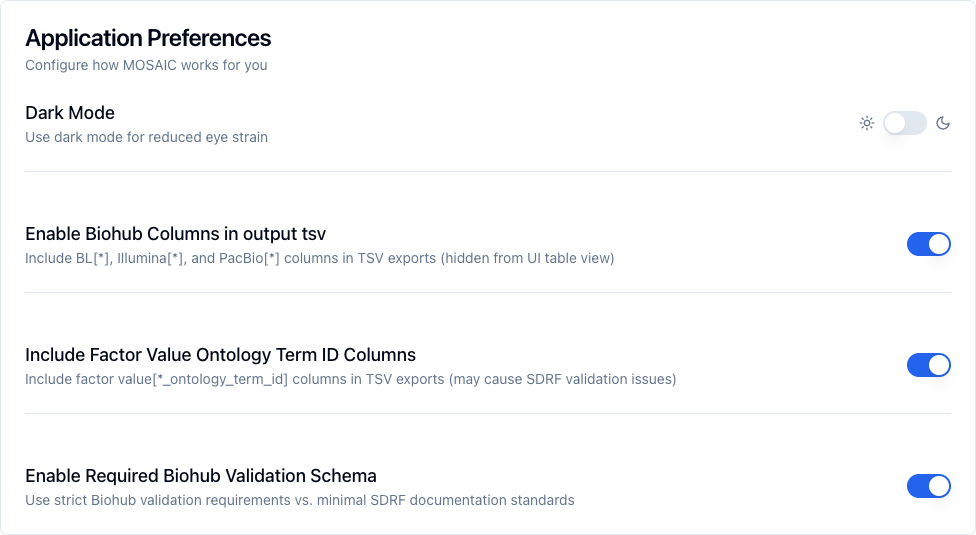
With either switch off, MOSAIC refuses to export Illumina and PacBio sheets, and BS3 rejects Mass Spec sheets for missing columns.
Build your sheet in MOSAIC
Click Enter samples on the MOSAIC home page, or Single Sheet Builder in the left menu. The builder has five steps, and each one opens when the previous one is done. The MOSAIC screenshots on this page show version 1.6.1.
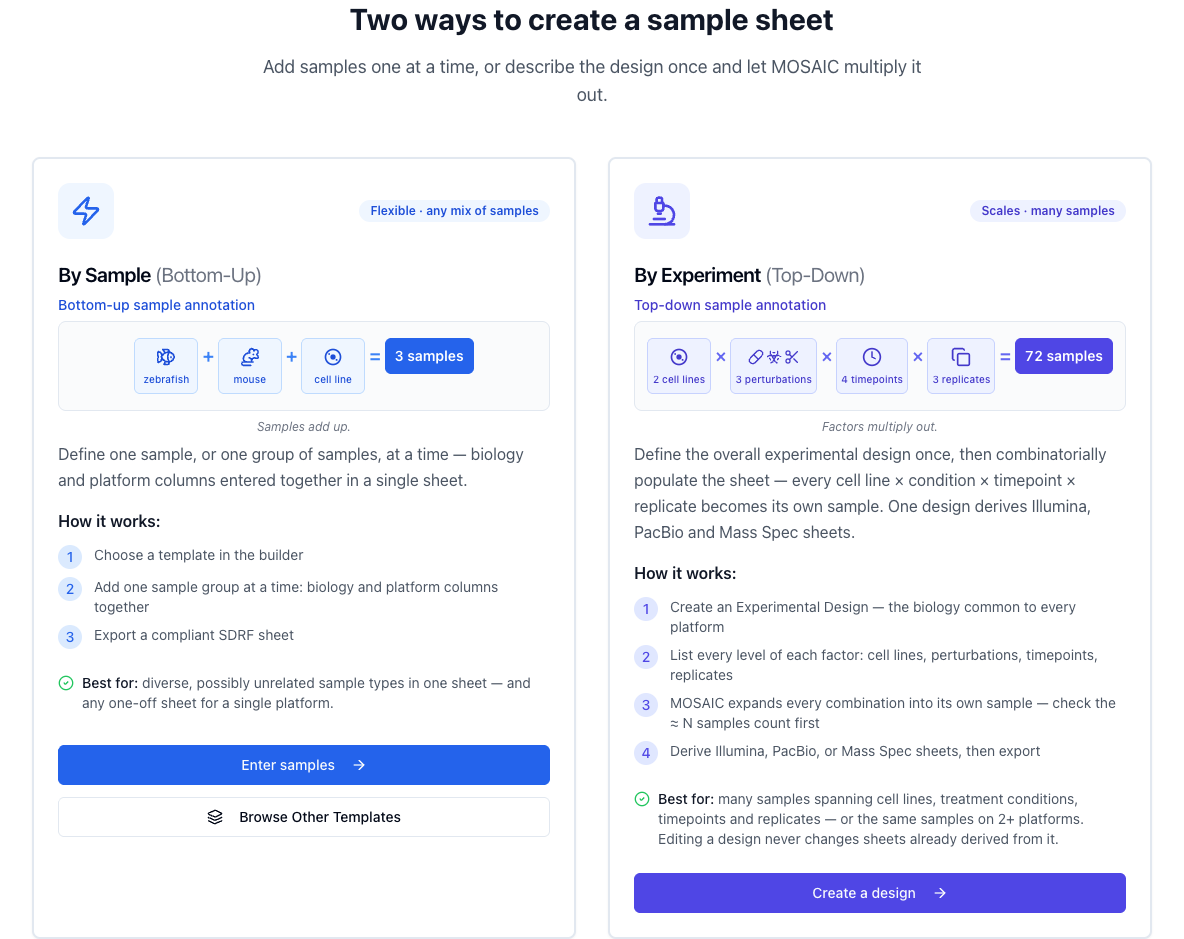
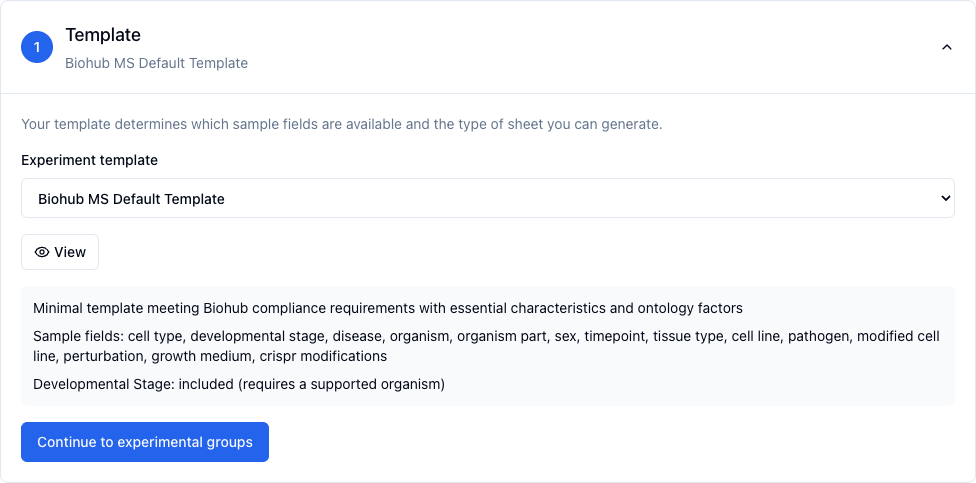
1. Template
Pick your platform's template in the Experiment template list, then click Continue to experimental groups.
| Platform | Template |
|---|---|
| Mass Spec | Biohub MS Default Template for most experiments. Biohub MS Cell Line Template, Biohub MS Pathogen Template, Biohub MS Method Dev when they fit better. |
| Illumina | Biohub Illumina Template |
| PacBio | Biohub PacBio Template |
The template sets the sheet type, so only the Illumina and PacBio templates make sequencing sheets. It locks once you add a group. Delete all groups to change it.
2. Experimental groups
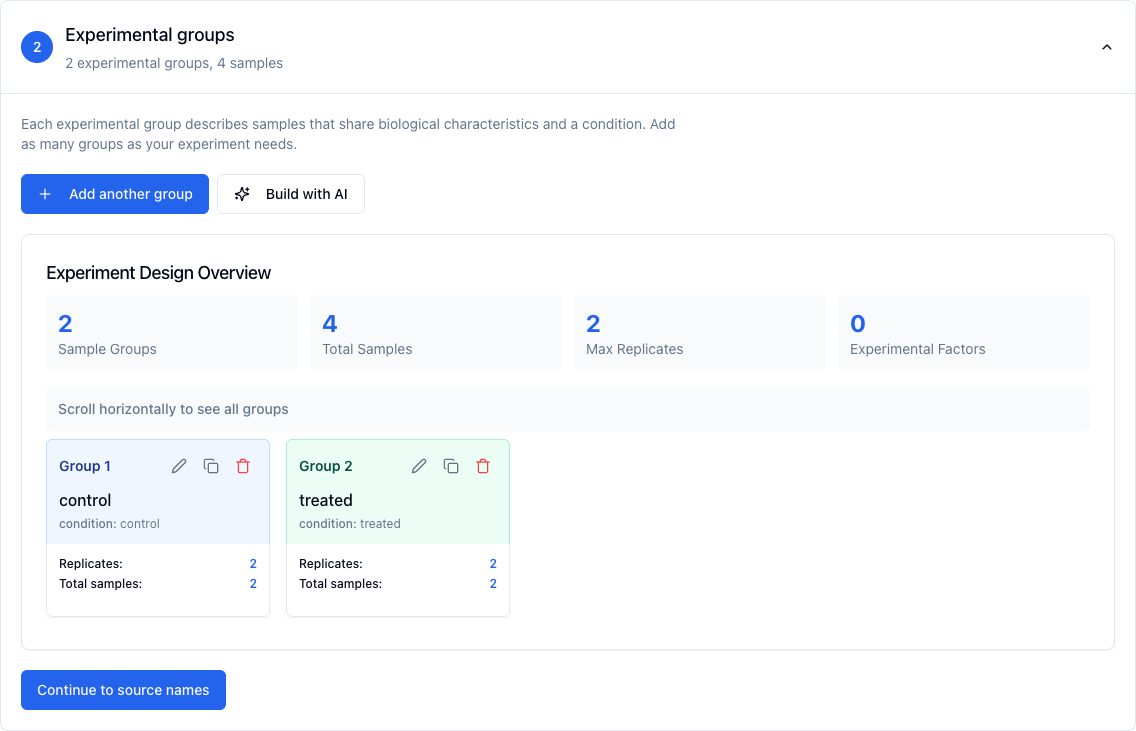
A group is a set of samples that share their biology and condition, such as untreated HeLa cells. Click Add your first experimental group to open the Add Sample Group dialog.
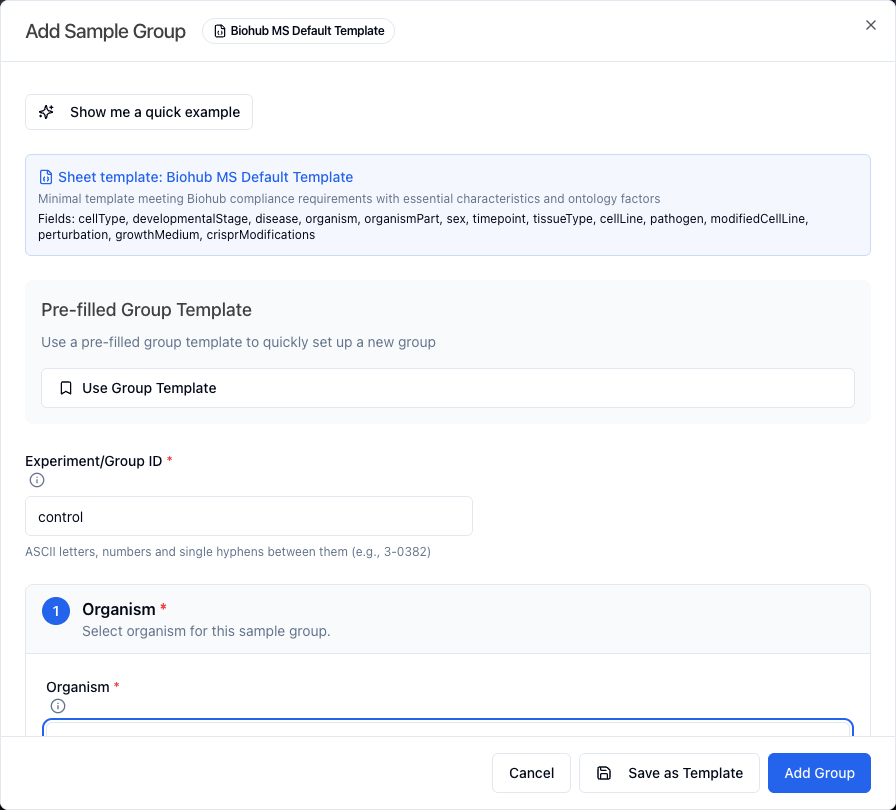
- Experiment/Group ID is a short name for the group, such as "control". It becomes part of every sample name.
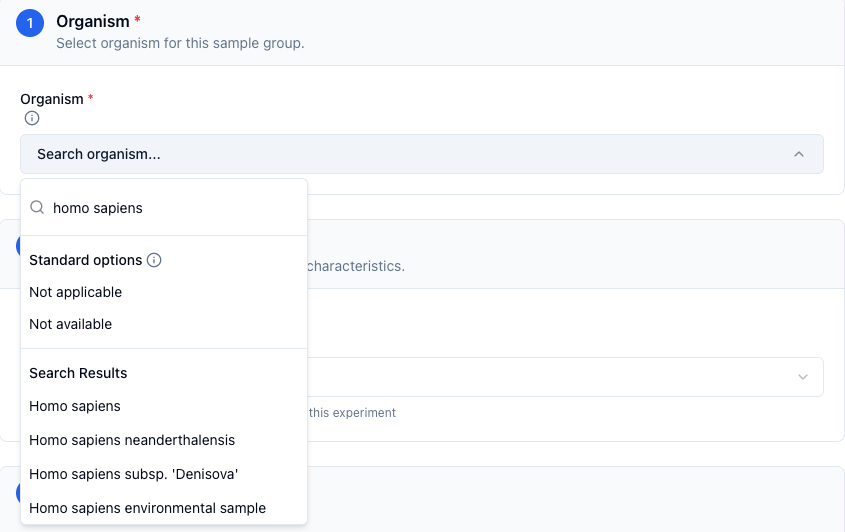
- Organism. Type at least three letters and pick the term from the list. MOSAIC won't accept an organism typed as a custom value, because it has no ID.
- Tissue. Choose the Tissue Type first. It decides what else you must fill in. A cell line needs Cell Line and Passage Number, a cell culture needs Cell Type, a tissue or organoid needs Organism Part or Tissue, and an organelle needs Organelle.
- Replication. Biological Replicates is how many samples the group has. Technical Replicates repeat each one. Fraction Count appears on Mass Spec sheets only. MOSAIC makes one row for every combination.
- Conditions. Every group needs a Condition, such as "untreated".
- Everything else is optional. Fill in what you know. MOSAIC exports the rest as "not available", or as "not applicable" where a field does not fit the tissue type, such as Passage Number on anything but a cell line.
Click Add Group. To make a similar group, click the copy icon on its card. The copy gets a numbered Experiment/Group ID, such as control2, so rename it and change what differs. A card marked Needs repair has a problem MOSAIC can point to. Click Repair group to fix it.
Every ontology field searches as you type. Type at least three characters and pick a result. Some fields also list Suggested defaults before you type. The list starts with Standard options, Not applicable and Not available, for samples with no term. Use custom value only when no term fits, because a custom value has no ID.
3. Source names
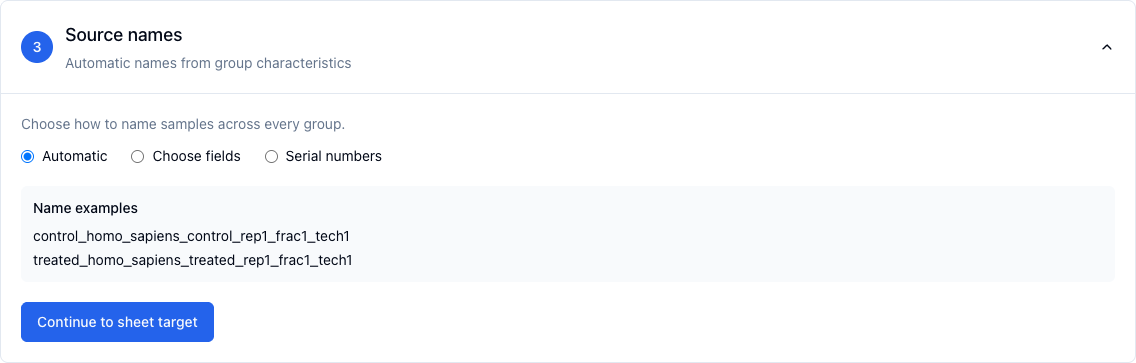
Choose how MOSAIC names each sample. Automatic builds names from the group, Choose fields builds them from up to five fields you pick, and Serial numbers counts up. Check the Name examples, then click Continue. The button names the next step: Continue to Biohub (BL) columns on a Mass Spec sheet, Continue to Illumina columns or Continue to PacBio columns on a sequencing sheet.
4. Biohub columns
This step is named for your platform: Biohub (BL) columns on a Mass Spec sheet, Illumina columns or PacBio columns on a sequencing sheet. It lists every sample, with a cell for each facility column. The columns BS3 needs a real value in are marked Needed. Fill in real values wherever you can.
- Type each sample's value. To give every sample the same value, pick the column under Fill a column, enter the value and click Fill every sample. You can also paste a block copied from a spreadsheet into any cell.
-
On an Illumina sheet MOSAIC checks each value as you type, against the BS3 upload
rules that don't depend on your run, and refuses one that breaks them. For example,
Illumina[Sample_ID]takes only letters, numbers, "-" and "_". Index lengths and unique names are still checked by BS3 at upload. On a PacBio sheet MOSAIC refuses only tabs, line breaks and double quotes. -
For an Illumina index column your run doesn't use, such as
Illumina[Index2_ID]andIllumina[Index2]on a single-index run, click Not used on this run under its header. MOSAIC writes "not available" in it on every sample. - A Needed cell you leave blank exports as "Please fill this value". The step counts those cells and reminds you that BS3 rejects the sheet until you fill them, here or in the downloaded file.
Click Continue to sheet target. Blank cells don't stop you, but the sheet target stays locked until you click it.
5. Sheet target
The sheet target applies to every group.
- Mass Spec sheets need a Technology Type, such as "proteomic profiling by mass spectrometry", then an Analysis Type and a Mass Spec Platform.
-
Illumina and PacBio sheets need an EFO Assay, such as "RNA-Seq". MOSAIC writes it
to the
technology typecolumns.
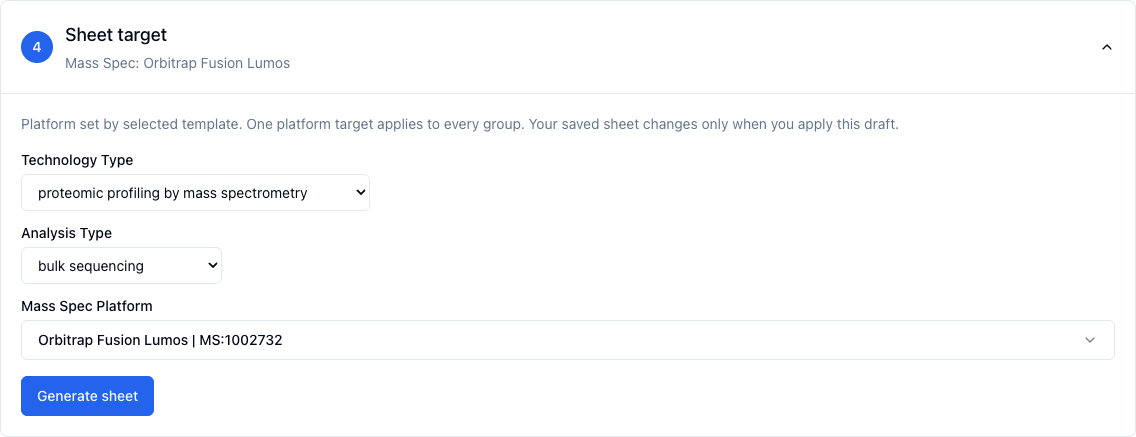
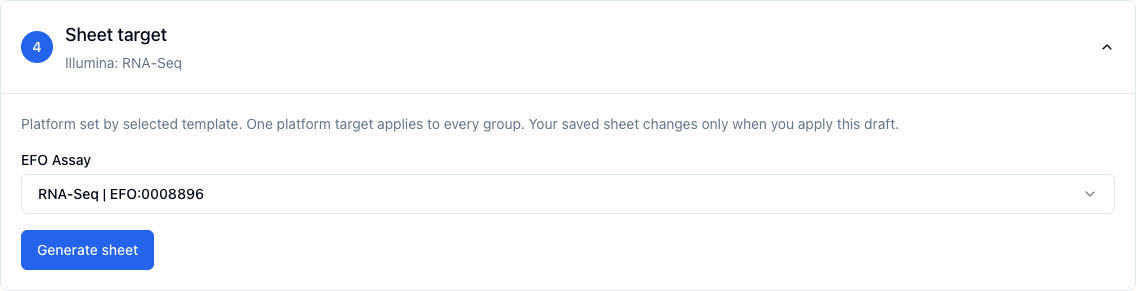
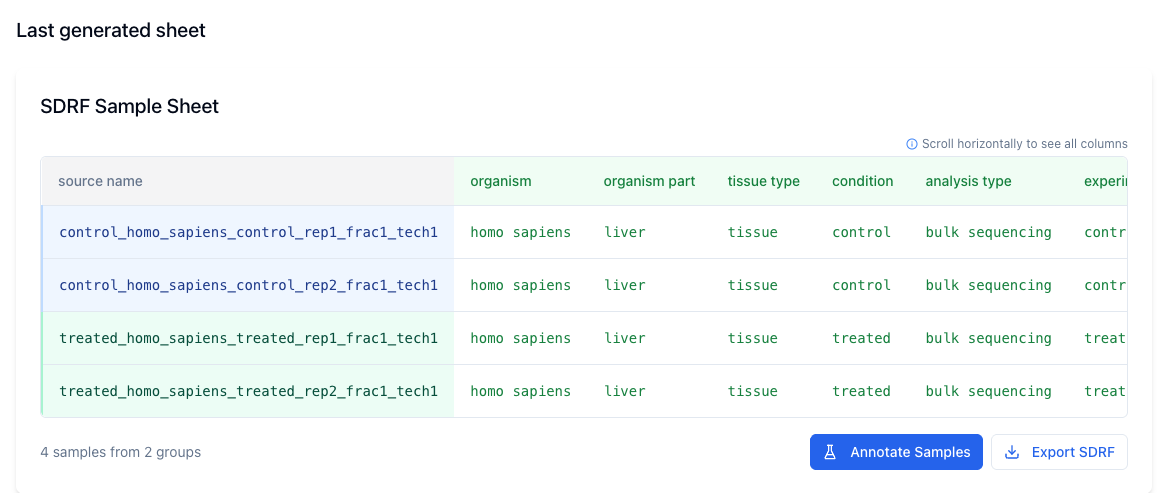
Click Generate sheet. The finished table appears under Last generated sheet. Once a sheet exists the button reads Update sheet. Changes you make to groups reach the sheet, and its export, only after you click Update sheet.
Shortcuts for bigger experiments
- Power User Mode, a switch in the left menu, adds Bulk Sample Creation. It builds many groups from a CSV file.
- Save as Template in the group dialog stores a group's fields so you can reuse them.
- Build with AI drafts groups from a description. Check every field it fills in.
- Experimental Designs describe an experiment once and derive a sheet from it.
Export and finish the sheet
- Under Last generated sheet, click Export SDRF.
- MOSAIC warns you about the facility columns and counts the cells, if any, that will download as "Please fill this value". Tick "I have read and understand what to fill in for the ... columns" and click Continue Export.
-
Your browser downloads
sdrf.tsv. MOSAIC may also show a pop-up listing Experiment/Group IDs it adjusted for BS3.
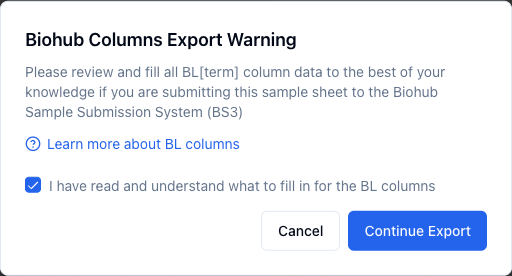
MOSAIC writes the facility values you entered in the Biohub columns step. A Needed
cell you left blank gets "Please fill this value", and the other blank cells get "not
available". If the export warning counted any "Please fill this value" cells, fill them
in that step, click Continue to sheet target, then Update sheet, and export again. Or
open sdrf.tsv in a spreadsheet and replace each one. The checklist for
your platform below says which columns matter.
Editing the TSV without breaking it
-
Google Sheets works well. Use File, Import, Upload, choose
sdrf.tsvand keep the tab separator. When you finish, use File, Download, Tab-separated values. -
Excel works with care. Save with File, Save As, Text (Tab delimited), then rename
the file so it ends in
.tsv. Never choose Unicode Text. It saves UTF-16, which BS3 can't read. - Spreadsheets reformat values that look like dates or numbers, such as the gene name MARCH1 or an ID with leading zeros. Check those cells before you save.
- Google Sheets turns true and false into TRUE and FALSE. BS3 accepts either.
Whatever you edit with:
- Keep every header exactly as MOSAIC wrote it. Header names are case-sensitive.
- Don't delete columns, even ones full of "not available".
- Don't leave blank lines, including one at the end of the file, or tabs after the last column.
- Leave
bh[sdrf version]andsdrf_conversion_notesas they are.
Mass Spec checklist
- Template. One of the Biohub MS templates listed in step 1.
- Sheet target. The Technology Type that matches your analysis: proteomic, metabolomic, lipidomic or imaging profiling by mass spectrometry. Then the Analysis Type and the Mass Spec Platform.
-
Facility columns. Fill in
BL[preparation]andBL[sample label]on every row, andBL[multiplexing]for multiplexed samples. Fill in the other BL columns when you can. Leave outBL[injection volume],BL[method file],BL[plate id],BL[well position],BL[workflow],BL[searchgroup]andBL[experiment alias]. The Mass Spec team adds those. MOSAIC's BL column help describes each one. -
Rules BS3 checks on Mass Spec sheets.
-
characteristics[experiment_or_group_id]: Every row needs a real value. "not available" is not accepted. Letters and numbers, with single hyphens between them, for example "3-0382". No spaces or underscores. "not available" is not accepted. -
characteristics[organism]: Every row needs a value. Letters, numbers and spaces only. Strain names with hyphens or periods fail. - Replicate and fraction numbers: Every row needs a value. A whole number, 1 or higher.
-
Only
comment[cleavage agent details](one per enzyme) andcomment[modification parameters](one per PTM) may appear more than once. Keep those headers as MOSAIC writes them, without a number added to make them unique.
-
- Upload. Use the Mass Spec submission form and its "Upload the sample sheet" field. Your project must already be approved, and the PI, institute, project ID and organization must match it. BS3 counts the samples from the rows of your sheet.
Illumina checklist
- Template. Biohub Illumina Template.
- Sheet target. The EFO Assay for your libraries, such as RNA-Seq.
-
Facility columns. Fill in these on every row:
Illumina[Study_Description],Illumina[BioSample_Description],Illumina[Sample_ID],Illumina[Sample_Name],Illumina[Sample_Project]andIllumina[Index]. The exception is a pool of one library with no index read. LeaveIllumina[Index]empty for it. "not available" is also accepted there. -
Study_ID and Index_ID. Fill in
Illumina[Study_ID]on every row, or write "not available" on every row, and do the same forIllumina[Index_ID]. BS3 rejects a column that mixes values with "not available". MOSAIC writes "not available" in each of these cells you leave blank, so in its Biohub columns step fill each column for every sample or for none. -
Index 2.
Illumina[Index2_ID]andIllumina[Index2]: Fill in every row, or leave every row empty or "not available". Fill both for dual-index runs. Write "not available" in both for single-index runs. BS3 rejects a pool that mixes the two. -
Demultiplexing checks. The sequencing pipeline demultiplexes your run
from these columns, so BS3 checks them with the classic sample sheet rules. The sheet
needs one row per library in the pool. Index sequences use only A, C, G and T and have
the index lengths you enter in the form, and every index pair is different.
Sample_ID, Sample_Name and Sample_Project start with a letter and use only letters,
numbers, "-" and "_". Sample_ID and Sample_Name are unique. Sample_Project is spelled
with the same upper and lower case in every row. BioSample_Description has more than 5
characters. None of these cells contains commas or special characters. A "not available"
counts as empty, so BS3 rejects it in every facility column except
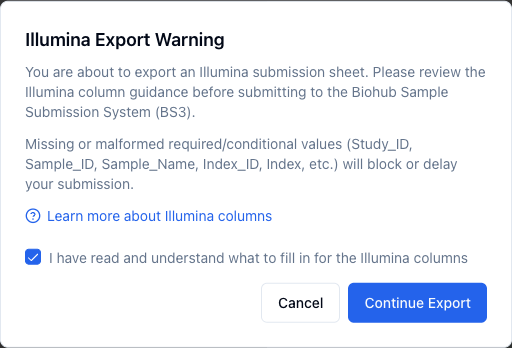
Illumina[Study_ID],Illumina[Index_ID]and the Index 2 columns.Illumina[Study_ID]andIllumina[Index_ID]take it only when every row uses it.Illumina[Index]accepts it, or an empty cell, only for the exception above. MOSAIC's Illumina column help explains every column. - Upload. Use the Illumina submission form for San Francisco or New York and its "Upload the sample sheet" field. The number of libraries in the pool and the index lengths you enter in the form must match the sheet.
PacBio checklist
- Template. Biohub PacBio Template.
- Sheet target. The EFO Assay for your libraries.
-
Facility columns. Fill in these on every row:
PacBio[Study_ID],PacBio[Study_Description],PacBio[BioSample_Description],PacBio[Sample_Name],PacBio[Sample_Project]andPacBio[Index_ID]. The exception is a pool of one library with no index read. LeavePacBio[Index_ID]as "not available" for it. -
BS3 rejects "not available" in
PacBio[Study_Description],PacBio[BioSample_Description],PacBio[Sample_Name]andPacBio[Sample_Project], and only checks thatPacBio[Study_ID]andPacBio[Index_ID]are filled in. The Genomics team needs real values in all of them. MOSAIC's PacBio column help explains every column. -
Upload. Use the
PacBio submission form
and its "Upload barcode sample sheet" field. If the form shows an error, choose
the file again before you resubmit, because the browser drops it. BS3 takes the
submission's organism from
characteristics[organism].
Upload it to BS3
- Open the submission form for your platform. Each checklist above links to it.
- Log in before you fill anything in, because logging in reloads the page. Use the yellow Log in with Okta link at the top of the form, which brings you back to it. CZ Biohub institutes only appear in the institute list after you log in.
- Choose your institute. For a CZ Biohub institute BS3 turns off the classic option and keeps Use SDRF selected.
- Pick your Deriva Study in the Metadata Hierarchy fields: Program, then Investigation, then Study. Submissions for a CZ Biohub institute need one.
- Under Sample Sheet Type keep Use SDRF, then choose your
.tsvfile in the upload field. - Fill in the rest of the form and submit it.
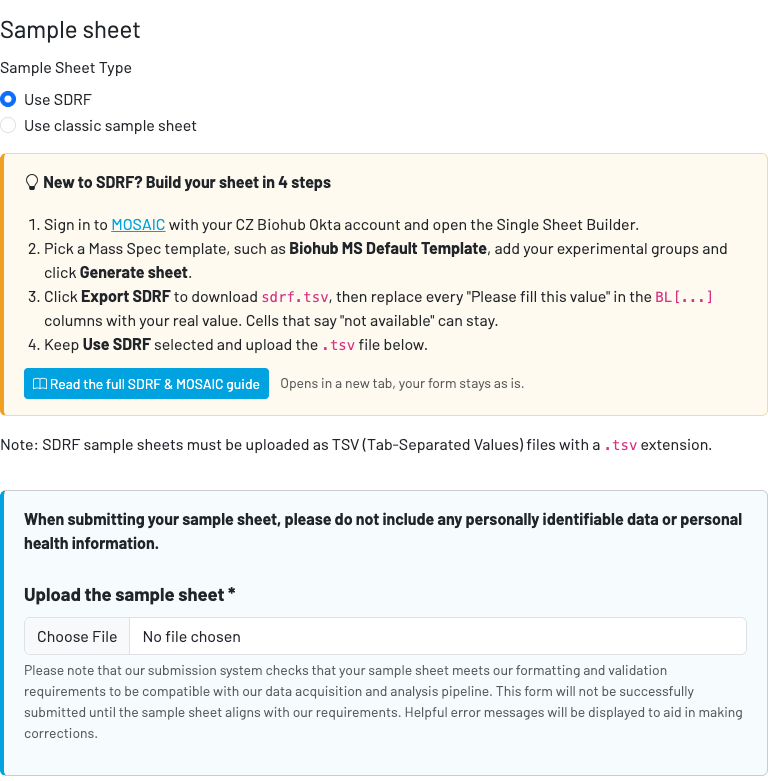
BS3 checks the sheet when you submit. It runs the checks in stages and stops at the first stage that fails. First come the file type and encoding, then the header and the shape of the rows, then each column's rules, then empty cells anywhere in the sheet, and last the organism IDs and duplicate rows. The column-rule and empty-cell stages list every failing column at once. Fixing one problem can reveal the next, so a hand edited sheet can take a few rounds.
The Illumina form shows sheet errors at the top of the page. The Mass Spec and PacBio forms show them under the upload field.
Fixing upload errors
The messages below are quoted exactly. Text in angle brackets, such as
<column>, stands for the column or rows the message names.
| BS3 says | What it means | How to fix it |
|---|---|---|
| The file name does not end in .tsv. | Upload the sdrf.tsv file that MOSAIC exported. If you edited it in a spreadsheet, download it as tab-separated values with a .tsv extension. | |
| BS3 could not read the file as tab-separated text. Saving from Excel as Unicode Text, which is UTF-16, causes this. | Save the sheet again as plain tab-separated text. In Google Sheets that is File, Download, Tab-separated values. | |
| The file is not shaped like a sample sheet. A file with no header row does this. The Mass Spec form words the message a little differently. | Start again from the MOSAIC export. If it keeps happening, email the platform team and attach the file. | |
| These required headers are not in the first row. Header names must match exactly, including capitals, spaces and brackets. | Export again from MOSAIC with both Settings switches on, and keep its headers as they are. The column reference on this page lists every required column. | |
| Two columns share a header. Only comment[cleavage agent details] and comment[modification parameters] may repeat, and only on Mass Spec sheets. Two tabs at the end of a line also create repeated empty headers. | Delete or rename the repeated column and remove trailing tabs. | |
| A required column has a blank cell, or a cell that says none, NA, N/A, nan or null. BS3 treats those words as empty. In a column that needs a real value, "not available" and "not applicable" count as empty too. | Fill in every cell. Where the column reference allows it, write "not available" when a value is unknown and "not applicable" when it does not apply. | |
| The same rule applies to every other column, including ones you added. A tab at the end of every line creates an unnamed column, reported as Column ''. | Fill in the column, delete it, or remove the trailing tabs. | |
| MOSAIC writes "Please fill this value" in each cell only you can fill in, such as the sample names and index sequences, that you left blank in its Biohub columns step. BS3 rejects a sheet that still has one. This message numbers rows from the first sample row. | Replace every "Please fill this value" with the real value, in the TSV or in MOSAIC's Biohub columns step before you export again. On a single-index Illumina run, write "not available" in Illumina[Index2_ID] and Illumina[Index2], or click Not used on this run under them in MOSAIC. For a pool of one library with no index read, leave Illumina[Index] empty, or click Not used on this run under it. | |
| The file has a header row but no sample rows. | Generate the sheet in MOSAIC before you export it. | |
| In a TSV this means a line has more or fewer tabs than the header. The usual causes are a tab typed inside a cell, a missing cell, or a blank line at the end of the file. The header counts as row 1. | Fix that line or delete the blank line. | |
| Two rows are identical in every column. This message numbers rows from the first sample row. | Make every row describe a different sample or measurement, or delete the copy. | |
| One organism name is paired with different NCBI Taxonomy IDs in different rows. | Use one ID per organism. Picking the organism from the MOSAIC dropdown keeps the name and the ID together. | |
| On Mass Spec sheets the Experiment/Group ID may contain only letters and numbers, with single hyphens between them. Spaces, underscores, a hyphen at the start or end, doubled hyphens and "not available" are all rejected. | Rename the group in MOSAIC, for example to "control-1" instead of "control_1". | |
| On Mass Spec sheets the organism name may contain only letters, numbers and spaces. A strain name such as "Escherichia coli K-12" is rejected. | Choose the species-level term if it describes your samples. Otherwise email the Mass Spec team. | |
| Replicate and fraction numbers must be whole numbers from 1 up. These columns do not accept "not available". | Use 1 when there is a single replicate or fraction. | |
| Illumina[Index_ID], Illumina[Index], Illumina[Index2_ID], Illumina[Index2] and sdrf_conversion_notes must be filled in on every row, or empty or "not available" on every row. BS3 rejects a pool that mixes single-index and dual-index libraries. | Fill in both index 2 columns for every library, or for none of them, and do the same for Illumina[Index_ID]. Fill in Illumina[Index] for every library unless the pool is one library with no index read. Email the Genomics team before you submit a mixed pool. | |
| The sequencing pipeline demultiplexes your run from the Illumina[...] columns, so BS3 checks them with the classic sample sheet rules and the run details in the form. The message names the column, and data row 1 is the first sample row. A blank or "not available" index counts as empty. | Correct that column in MOSAIC, or the number of libraries or index lengths in the form, then upload again. | |
| You chose a CZ Biohub institute without being logged in, or your login expired. | Use the Log in with Okta link at the top of the form, which brings you back to it, then fill in the form again. | |
| CZ Biohub institutes cannot use the classic CSV sample sheet. | Choose Use SDRF and upload the TSV you built in MOSAIC. |
When MOSAIC refuses to export
| MOSAIC says | What it means | How to fix it |
|---|---|---|
| MOSAIC refuses to export an Illumina or PacBio sheet while Include Factor Value Ontology Term ID Columns is off. | Turn it on in MOSAIC Settings, then export again. | |
| MOSAIC refuses to export an Illumina or PacBio sheet while Enable Biohub Columns in output tsv is off. | Turn it on in MOSAIC Settings, then export again. |
Column reference
Every column BS3 checks, per platform. This list is generated from the same checks BS3 runs at upload, so it always matches them. A sheet may carry extra columns, as long as every cell in them is filled in.
Mass Spec columns (40)
| Column | Required | What BS3 checks | "not available" allowed | What to put in it |
|---|---|---|---|---|
source name |
Yes | Every row needs a value. | Yes | Your name for each sample, one per row. MOSAIC fills it from the Source names step. |
characteristics[organism part] |
Yes | Every row needs a value. | Yes | Anatomical part or tissue as an UBERON term name, for example "liver". |
characteristics[cell type] |
Yes | Every row needs a value. | Yes | Cell type as a Cell Ontology term name, for example "T cell". |
characteristics[disease] |
Yes | Every row needs a value. | Yes | Disease as a MONDO term name. Use "normal" for healthy samples. |
characteristics[developmental stage] |
Yes | Every row needs a value. | Yes | Developmental stage, from the stage ontology for the organism. That is HsapDv for human and MmusDv for mouse, for example. |
characteristics[timepoint] |
Yes | Every row needs a value. | Yes | Time point of the sample in a time series. MOSAIC writes "not available" when you leave Timepoint empty. |
characteristics[tissue type] |
Yes | Every row needs a value. | Yes | Kind of material. One of tissue, cell line, cell culture, organoid or organelle. |
characteristics[organism] |
Yes | Every row needs a value. Letters, numbers and spaces only. | Yes | Species the sample comes from, as its NCBI Taxonomy name, for example "Homo sapiens". Pick it from the MOSAIC dropdown so the matching ID lands in factor value[organism]. |
characteristics[experiment_or_group_id] |
Yes | Every row needs a real value. "not available" is not accepted. Letters and numbers, with single hyphens between them, for example "3-0382". No spaces or underscores. | No | The Experiment/Group ID you gave the group in MOSAIC, for example "control". |
characteristics[biological replicate] |
Yes | Every row needs a value. A whole number, 1 or higher. | No | Biological replicate number within the group, counting from 1. |
assay name |
Yes | Every row needs a value. | Yes | Name of the measurement on that row. MOSAIC fills it. |
technology type |
Yes | Every row needs a value. | Yes | Kind of assay. MOSAIC fills it from Technology Type on Mass Spec sheets and from the EFO Assay you chose as the sheet target on Illumina and PacBio sheets. |
comment[data file] |
Yes | Every row needs a value. | Yes | Raw data file name. "not available" is fine at submission. |
comment[label] |
Yes | Every row needs a value. | Yes | Labeling as a PSI-MS term, for example "AC=MS:1002038;NT=label free sample". |
comment[instrument] |
Yes | Every row needs a value. | Yes | Mass spectrometer as a PSI-MS term. MOSAIC calls it Mass Spec Platform. |
comment[fraction identifier] |
Yes | Every row needs a value. A whole number, 1 or higher. | No | Fraction number. Use 1 when the sample is not fractionated. |
comment[technical replicate] |
Yes | Every row needs a value. A whole number, 1 or higher. | No | Technical replicate number, counting from 1. |
factor value[organism] |
Yes | Every row needs a value. | Yes | NCBI Taxonomy ID of the organism, for example "NCBITaxon:9606". Each organism name must map to one ID across the whole sheet. |
factor value[organism part] |
Yes | Every row needs a value. | Yes | UBERON ID of the organism part, for example "UBERON:0002107". |
factor value[cell type] |
Yes | Every row needs a value. | Yes | Cell Ontology ID of the cell type, for example "CL:0000084". |
factor value[disease] |
Yes | Every row needs a value. | Yes | MONDO ID of the disease. Healthy samples use "PATO:0000461". |
factor value[developmental stage] |
Yes | Every row needs a value. | Yes | Ontology ID of the developmental stage. |
BL[preparation] |
Yes | Every row needs a real value. "not available" is not accepted. | No | How samples with a similar biological background were prepared differently, such as the IP antibody, digestion enzyme or media. Examples are "0.1 DMSO" and "mock IP". |
BL[sample label] |
Yes | Every row needs a real value. "not available" is not accepted. | No | Label on the tube or plate position, for example "P4A4" or "Tube-001". It does not need to match the source name. |
BL[sample description] |
Yes | Every row needs a value. | Yes | Longer description of the sample, useful for grouping during analysis. |
BL[preparation description] |
Yes | Every row needs a value. | Yes | Longer description of the preparation method. |
BL[fraction description] |
Yes | Every row needs a value. | Yes | How the sample was fractionated, for example "Fraction 1 of 8". |
BL[multiplexing] |
Yes | Every row needs a value. | Yes | Required for multiplexed samples. Give the channel and lot number separated by a space, for example "131N set2". |
BL[vessel format] |
Yes | Every row needs a value. | Yes | What the sample is held in, for example "96-well plate" or "PCR tube". |
BL[form] |
Yes | Every row needs a value. | Yes | Material the platform receives, for example "cell pellet" or "dried digested peptide". |
BL[quantity submitted] |
Yes | Every row needs a value. | Yes | Amount of material in the vessel, as a number. The unit goes in BL[unit]. |
BL[unit] |
Yes | Every row needs a value. | Yes | Unit of BL[quantity submitted], for example "ug" or "uL". |
BL[notes] |
Yes | Every row needs a value. | Yes | Anything else the Mass Spec team should know. |
BL[injection volume] |
Optional | Every row needs a value. | Yes | The Mass Spec team fills this in after submission, and BS3 sets BL[experiment alias] itself. Leave this column out of your sheet. |
BL[method file] |
Optional | Every row needs a value. | Yes | The Mass Spec team fills this in after submission, and BS3 sets BL[experiment alias] itself. Leave this column out of your sheet. |
BL[plate id] |
Optional | Every row needs a value. | Yes | The Mass Spec team fills this in after submission, and BS3 sets BL[experiment alias] itself. Leave this column out of your sheet. |
BL[well position] |
Optional | Every row needs a value. A letter followed by letters or numbers, for example "A1", with no leading zeros ("A01" is rejected). 1, 2 and 3 are accepted only on the reagent plates SR, SG, SB and SY. S0 is only for MS imaging. | Yes | The Mass Spec team fills this in after submission, and BS3 sets BL[experiment alias] itself. Leave this column out of your sheet. |
BL[workflow] |
Optional | Every row needs a value. | Yes | The Mass Spec team fills this in after submission, and BS3 sets BL[experiment alias] itself. Leave this column out of your sheet. |
BL[searchgroup] |
Optional | Every row needs a value. | Yes | The Mass Spec team fills this in after submission, and BS3 sets BL[experiment alias] itself. Leave this column out of your sheet. |
BL[experiment alias] |
Optional | Every row needs a value. | Yes | The Mass Spec team fills this in after submission, and BS3 sets BL[experiment alias] itself. Leave this column out of your sheet. |
Illumina columns (43)
| Column | Required | What BS3 checks | "not available" allowed | What to put in it |
|---|---|---|---|---|
source name |
Yes | Every row needs a value. | Yes | Your name for each sample, one per row. MOSAIC fills it from the Source names step. |
characteristics[organism] |
Yes | Every row needs a value. | Yes | Species the sample comes from, as its NCBI Taxonomy name, for example "Homo sapiens". Pick it from the MOSAIC dropdown so the matching ID lands in factor value[organism]. |
characteristics[pathogen] |
Yes | Every row needs a value. | Yes | Pathogen in the sample as an NCBI Taxonomy name, or "not applicable". |
characteristics[sex] |
Yes | Every row needs a value. | Yes | Sex. One of female, male, mixed, unknown or not applicable. |
characteristics[tissue type] |
Yes | Every row needs a value. | Yes | Kind of material. One of tissue, cell line, cell culture, organoid or organelle. |
characteristics[tissue] |
Yes | Every row needs a value. | Yes | Tissue the sample comes from. MOSAIC copies the Organism Part you picked. |
characteristics[developmental stage] |
Yes | Every row needs a value. | Yes | Developmental stage, from the stage ontology for the organism. That is HsapDv for human and MmusDv for mouse, for example. |
characteristics[disease] |
Yes | Every row needs a value. | Yes | Disease as a MONDO term name. Use "normal" for healthy samples. |
characteristics[organism part] |
Yes | Every row needs a value. | Yes | Anatomical part or tissue as an UBERON term name, for example "liver". |
characteristics[cell type] |
Yes | Every row needs a value. | Yes | Cell type as a Cell Ontology term name, for example "T cell". |
characteristics[modified cell line] |
Yes | Every row needs a value. | Yes | Details of a modified cell line, when there is one. |
characteristics[cell line] |
Yes | Every row needs a value. | Yes | Cell line as its Cellosaurus name, for example "HeLa". |
characteristics[biological replicate] |
Yes | Every row needs a value. | Yes | Biological replicate number within the group, counting from 1. |
characteristics[perturbation] |
Yes | Every row needs a value. | Yes | Perturbation applied to the sample. Write "not applicable" rather than "none", because BS3 treats "none" as an empty cell. |
characteristics[passage number] |
Yes | Every row needs a value. | Yes | Passage number of a cell line. MOSAIC writes "not applicable" for samples that are not a cell line. |
characteristics[growth medium] |
Yes | Every row needs a value. | Yes | Growth medium the cells were grown in. |
characteristics[timepoint] |
Yes | Every row needs a value. | Yes | Time point of the sample in a time series. MOSAIC writes "not available" when you leave Timepoint empty. |
assay name |
Yes | Every row needs a value. | Yes | Name of the measurement on that row. MOSAIC fills it. |
technology type |
Yes | Every row needs a value. | Yes | Kind of assay. MOSAIC fills it from Technology Type on Mass Spec sheets and from the EFO Assay you chose as the sheet target on Illumina and PacBio sheets. |
comment[multiplexing] |
Yes | Every row needs a value. | Yes | "true" when the pool holds more than one library, otherwise "false". MOSAIC fills it. |
factor value[organism] |
Yes | Every row needs a value. | Yes | NCBI Taxonomy ID of the organism, for example "NCBITaxon:9606". Each organism name must map to one ID across the whole sheet. |
factor value[pathogen] |
Yes | Every row needs a value. | Yes | NCBI Taxonomy ID of the pathogen. |
factor value[tissue] |
Yes | Every row needs a value. | Yes | UBERON ID of the tissue. MOSAIC copies the organism part ID. |
factor value[technology type] |
Yes | Every row needs a value. | Yes | EFO ID of the assay, for example "EFO:0008896" for RNA-Seq. MOSAIC fills it from the sheet target. |
factor value[developmental stage] |
Yes | Every row needs a value. | Yes | Ontology ID of the developmental stage. |
factor value[disease] |
Yes | Every row needs a value. | Yes | MONDO ID of the disease. Healthy samples use "PATO:0000461". |
factor value[organism part] |
Yes | Every row needs a value. | Yes | UBERON ID of the organism part, for example "UBERON:0002107". |
factor value[cell type] |
Yes | Every row needs a value. | Yes | Cell Ontology ID of the cell type, for example "CL:0000084". |
factor value[cell line] |
Yes | Every row needs a value. | Yes | Cellosaurus accession of the cell line, for example "CVCL_0030". |
factor value[perturbation] |
Yes | Every row needs a value. | Yes | Ontology ID of the perturbation. MOSAIC writes "not available" because its perturbation field is free text. |
factor value[growth medium] |
Yes | Every row needs a value. | Yes | Ontology ID of the growth medium. MOSAIC writes "not available" because its growth medium field is free text. |
Illumina[Sample_ID] |
Yes | Every row needs a value. | No | Short, unique ID for each library, for example "L001". Starts with a letter and uses only letters, numbers, "-" and "_". It can be the same as Sample_Name. |
Illumina[Study_Description] |
Yes | Every row needs a value. | No | What the project behind this run is about. No commas or special characters. |
Illumina[BioSample_Description] |
Yes | Every row needs a value. | No | Description of the biological sample, longer than 5 characters and the same for every library made from it. No commas or special characters. |
Illumina[Study_ID] |
Yes | Every row needs a value. Fill in every row, or leave every row empty or "not available". | Yes | Short ID for your study or project, following your group's conventions. Letters, numbers, "-" and "_", for example "TDR". |
Illumina[Sample_Name] |
Yes | Every row needs a value. | No | Unique, descriptive name for each library. It becomes the FASTQ file name. Starts with a letter and uses only letters, numbers, "-" and "_". |
Illumina[Sample_Project] |
Yes | Every row needs a value. | No | Your FirstName_LastName, or the project each library should be demultiplexed into. Starts with a letter and uses only letters, numbers, "-" and "_". |
Illumina[Index_ID] |
Yes | Fill in every row, or leave every row empty or "not available". | Yes | Name of the first index, for example "Nextera-N700". |
Illumina[Index] |
Yes | Every row needs a value, except in a pool of one library with no index read, where the cell may be empty or "not available". | No | Sequence of index 1, the i7 index, for example "ATAGCGCT". Leave the cell empty only for a pool of one library with no index read. "not available" is also accepted there. |
Illumina[Index2_ID] |
Yes | Fill in every row, or leave every row empty or "not available". | Yes | Name of the second index. Write "not available" in every row for single-index runs. |
Illumina[Index2] |
Yes | Fill in every row, or leave every row empty or "not available". | Yes | Sequence of index 2, the i5 index. Fill in every row for dual-index runs, or write "not available" in every row for single-index runs. |
sdrf_conversion_notes |
Yes | Fill in every row, or leave every row empty or "not available". | Yes | Notes from MOSAIC's classic-to-SDRF converter. Sheets built in MOSAIC carry "[]". Leave it as it is. |
bh[sdrf version] |
Yes | Every row needs a value. | Yes | Sheet format version that MOSAIC writes, for example "illumina/1.5". Don't edit it. |
PacBio columns (38)
| Column | Required | What BS3 checks | "not available" allowed | What to put in it |
|---|---|---|---|---|
source name |
Yes | Every row needs a value. | Yes | Your name for each sample, one per row. MOSAIC fills it from the Source names step. |
characteristics[organism] |
Yes | Every row needs a value. | Yes | Species the sample comes from, as its NCBI Taxonomy name, for example "Homo sapiens". Pick it from the MOSAIC dropdown so the matching ID lands in factor value[organism]. |
characteristics[pathogen] |
Yes | Every row needs a value. | Yes | Pathogen in the sample as an NCBI Taxonomy name, or "not applicable". |
characteristics[sex] |
Yes | Every row needs a value. | Yes | Sex. One of female, male, mixed, unknown or not applicable. |
characteristics[tissue type] |
Yes | Every row needs a value. | Yes | Kind of material. One of tissue, cell line, cell culture, organoid or organelle. |
characteristics[tissue] |
Yes | Every row needs a value. | Yes | Tissue the sample comes from. MOSAIC copies the Organism Part you picked. |
characteristics[developmental stage] |
Yes | Every row needs a value. | Yes | Developmental stage, from the stage ontology for the organism. That is HsapDv for human and MmusDv for mouse, for example. |
characteristics[disease] |
Yes | Every row needs a value. | Yes | Disease as a MONDO term name. Use "normal" for healthy samples. |
characteristics[organism part] |
Yes | Every row needs a value. | Yes | Anatomical part or tissue as an UBERON term name, for example "liver". |
characteristics[cell type] |
Yes | Every row needs a value. | Yes | Cell type as a Cell Ontology term name, for example "T cell". |
characteristics[modified cell line] |
Yes | Every row needs a value. | Yes | Details of a modified cell line, when there is one. |
characteristics[cell line] |
Yes | Every row needs a value. | Yes | Cell line as its Cellosaurus name, for example "HeLa". |
characteristics[biological replicate] |
Yes | Every row needs a value. | Yes | Biological replicate number within the group, counting from 1. |
characteristics[perturbation] |
Yes | Every row needs a value. | Yes | Perturbation applied to the sample. Write "not applicable" rather than "none", because BS3 treats "none" as an empty cell. |
characteristics[passage number] |
Yes | Every row needs a value. | Yes | Passage number of a cell line. MOSAIC writes "not applicable" for samples that are not a cell line. |
characteristics[growth medium] |
Yes | Every row needs a value. | Yes | Growth medium the cells were grown in. |
characteristics[timepoint] |
Yes | Every row needs a value. | Yes | Time point of the sample in a time series. MOSAIC writes "not available" when you leave Timepoint empty. |
assay name |
Yes | Every row needs a value. | Yes | Name of the measurement on that row. MOSAIC fills it. |
technology type |
Yes | Every row needs a value. | Yes | Kind of assay. MOSAIC fills it from Technology Type on Mass Spec sheets and from the EFO Assay you chose as the sheet target on Illumina and PacBio sheets. |
factor value[organism] |
Yes | Every row needs a value. | Yes | NCBI Taxonomy ID of the organism, for example "NCBITaxon:9606". Each organism name must map to one ID across the whole sheet. |
factor value[pathogen] |
Yes | Every row needs a value. | Yes | NCBI Taxonomy ID of the pathogen. |
factor value[tissue] |
Yes | Every row needs a value. | Yes | UBERON ID of the tissue. MOSAIC copies the organism part ID. |
factor value[technology type] |
Yes | Every row needs a value. | Yes | EFO ID of the assay, for example "EFO:0008896" for RNA-Seq. MOSAIC fills it from the sheet target. |
factor value[developmental stage] |
Yes | Every row needs a value. | Yes | Ontology ID of the developmental stage. |
factor value[disease] |
Yes | Every row needs a value. | Yes | MONDO ID of the disease. Healthy samples use "PATO:0000461". |
factor value[organism part] |
Yes | Every row needs a value. | Yes | UBERON ID of the organism part, for example "UBERON:0002107". |
factor value[cell type] |
Yes | Every row needs a value. | Yes | Cell Ontology ID of the cell type, for example "CL:0000084". |
factor value[cell line] |
Yes | Every row needs a value. | Yes | Cellosaurus accession of the cell line, for example "CVCL_0030". |
factor value[perturbation] |
Yes | Every row needs a value. | Yes | Ontology ID of the perturbation. MOSAIC writes "not available" because its perturbation field is free text. |
factor value[growth medium] |
Yes | Every row needs a value. | Yes | Ontology ID of the growth medium. MOSAIC writes "not available" because its growth medium field is free text. |
PacBio[Study_Description] |
Yes | Every row needs a real value. "not available" is not accepted. | No | What the project behind this run is about. No commas or special characters. |
PacBio[BioSample_Description] |
Yes | Every row needs a real value. "not available" is not accepted. | No | Description of the biological sample, longer than 5 characters and the same for every library made from it. No commas or special characters. |
PacBio[Study_ID] |
Yes | Every row needs a value. | Yes | Short ID for your study or project, following your group's conventions. Letters, numbers, "-" and "_", for example "TDR". |
PacBio[Sample_Name] |
Yes | Every row needs a real value. "not available" is not accepted. | No | Unique, descriptive name for each library. It becomes the FASTQ file name. Starts with a letter and uses only letters, numbers, "-" and "_". |
PacBio[Sample_Project] |
Yes | Every row needs a real value. "not available" is not accepted. | No | Your FirstName_LastName, or the project each library should be demultiplexed into. Starts with a letter and uses only letters, numbers, "-" and "_". |
PacBio[Index_ID] |
Yes | Every row needs a value. | Yes | Name of the first index, for example "Nextera-N700". Leave the cell empty only for a pool of one library with no index read. "not available" is also accepted there. |
sdrf_conversion_notes |
Yes | Fill in every row, or leave every row empty or "not available". | Yes | Notes from MOSAIC's classic-to-SDRF converter. Sheets built in MOSAIC carry "[]". Leave it as it is. |
bh[sdrf version] |
Yes | Every row needs a value. | Yes | Sheet format version that MOSAIC writes, for example "illumina/1.5". Don't edit it. |
Questions
Can I build an SDRF sheet without MOSAIC?
You can, but you would type every header and ontology ID yourself. MOSAIC writes the exact headers BS3 expects and looks up the IDs. The column reference lists everything a hand-made sheet needs.
Can one sheet hold several organisms?
Yes. Each organism name has to keep the same ID on every row.
Can I change a value after I export?
Yes. Edit the TSV as described in Export and finish the sheet, or change the group in MOSAIC, click Update sheet under Sheet target and export again. MOSAIC exports the last sheet you generated, so group edits you haven't applied with Update sheet are not in the file. A new export writes only what MOSAIC has, so a value you typed only into the TSV is lost. Enter facility values in the Biohub columns step where you can.
How do I start a second sheet?
MOSAIC keeps one working sheet per account. Export the current one, then click Reset sheet and pick a template.
My pool mixes single-index and dual-index libraries
BS3 can't take that in one SDRF sheet. Email the Genomics team before you submit.
Getting help
Mass Spec:
- Chan Zuckerberg Biohub San Francisco, mass-spec@sf.czbiohub.org
- Chan Zuckerberg Biohub Chicago, mass-spec@chicago.czbiohub.org
Illumina and PacBio:
- Chan Zuckerberg Biohub San Francisco, seq-team@sf.czbiohub.org
- Chan Zuckerberg Biohub New York, seq-team@ny.czbiohub.org
Problems with MOSAIC itself go through Report a bug in the MOSAIC header. Problems with BS3 go through Report a bug at the bottom of this page.
Glossary
- SDRF
- Sample and Data Relationship Format, a tab-separated table with one row per sample or measurement.
- MOSAIC
- The Biohub web app that builds SDRF sheets.
- Ontology term
- An entry in a curated vocabulary, with a label such as "liver" and an ID such as UBERON:0002107.
- OLS
- The EBI Ontology Lookup Service, which MOSAIC searches when you type in an ontology field.
- Facility columns
- The BL, Illumina and PacBio columns, which carry what the Mass Spec and Genomics teams need.
- TSV
- Tab-separated values, a text file where a tab separates the cells of each row.
- Deriva
- Biohub's data catalog. BS3 sends it your sheet with your data.